Would you like to consistently attract new patients from Google? Many people search for a new doctor, dentist or healthcare professional by looking at the top of Google Maps, as they’re looking for local service providers.
Based on our patient surveys, the top two sources of new patients to your dental, medical or healthcare practice are patient referrals and Google. If people don’t know where to refer, they search on Google Maps.
Nearly all consumers (97 percent) now use online media when researching products or services in their local area… Among consumers surveyed, 90 percent use search engines.
BIA/Kelsey, 2010
When a person uses Google, they enter a ‘search query’ into the search box, which is the combination of words that they use to find what they’re looking for. For example, if a person is looking for a local dentist, they’ll likely use any of these search queries:
- Dentist near me
- Dentist [city]
- Downtown dentist
The results people see in Google vary depending on the keywords that are used, and the location of their search. Keywords are the groups of words that trigger your website to be displayed in Google Ads, Maps or Search results. Sometimes the keywords might match your search query exactly, other times it’s a similar phrase match.
Once a user sees their search results in Google, they likely click on the first few websites and almost always on the first page. In fact, according to Smart Insights 2023 data, ranking in the top three web page results gets 68.7% of all clicks:
- First place: 39.8%
- Second place: 18.7%
- Third place: 10.2%
If your healthcare website is not found on the first page of Google, your patients will have a hard time finding your practice. So, how do you get on the first page of Google?
When a person types a search query into Google, they usually see three results:
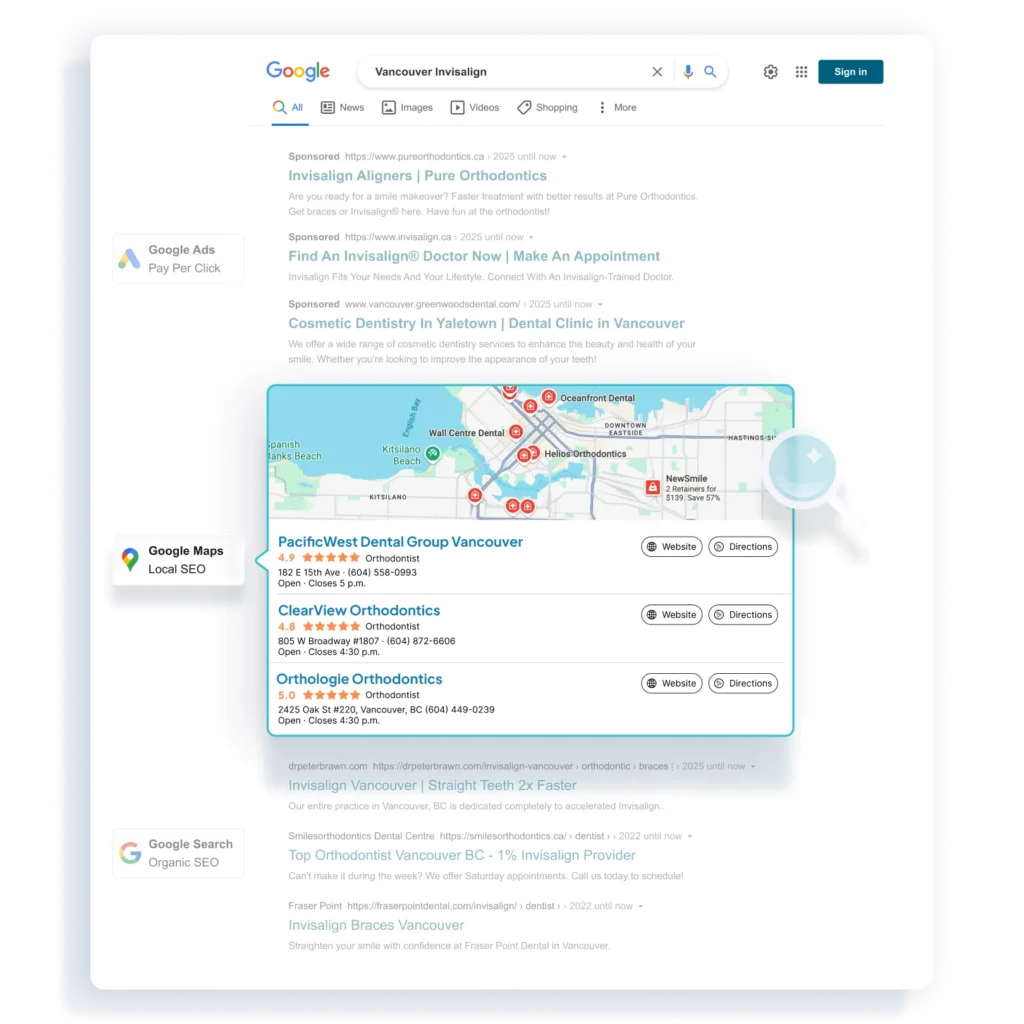
The results that users receive in each of these three sections are based on completely different factors.
How to Get to the Top of Google
In this 3-part guide, we’ll review how to get your dental, medical or healthcare website found on the first page of Google. Here’s what you’ll learn:
Part 1 – Google Ads: Pay Per Click
Google Ads for doctors and dentists are text, image, or video advertisements displayed by Google in their search engine results page, on websites and apps, as well as in Gmail or YouTube. Get your business website found on the first page of Google instantly using Google Ads, and use their powerful analytics to focus your ads to a specific audience of people interested in your healthcare services.
Part 2 – Google Maps: Local SEO
Local search engine optimization (SEO) is a set of tactics to increase the position of your website ranking in local search results, such as Google Maps. Many people use Google Maps when looking for a new dental or medical provider, so attract more patients to your healthcare clinic by increasing your rankings in Google Maps using healthcare local SEO for doctors and dentists.
Part 3 – Google Search: Organic SEO
Organic search engine optimization (SEO) is a set of tactics to increase the position of your website ranking in organic Google Search results. Dental and medical SEO for doctors and dentists often provides the best long-term value for growing your practice with new patients compared to paid advertising.
After reading this guide, you’ll understand how to grow your healthcare practice by being on the first page of Google. Let’s get started!
Part 2 – Google Maps: Local SEO
Would you like to consistently attract new patients from Google? Many patients search for a new doctor, dentist or healthcare professional using Google Maps, especially since they’re looking for local service providers.
In Part 1, we reviewed how to get your healthcare website on the first page of Google using Google Ads for doctors and dentists. Here, in Part 2, we’ll review how to get your dental or medical website to the top of Google Maps using healthcare local SEO.
What is Local Search Engine Optimization (SEO)?
46% of all searches now have “local intent” – using local city or neighbourhood names, or ‘near me’ added to the query.
Google
Local SEO (search engine optimization) is a set of tactics to increase the position of your healthcare website in local search results, such as in Google Maps.
When a person types a search query in Google, the first thing they see are paid advertisements from Google Ads. Below that are Google Maps, followed by Google Search.
Sometimes a person types a search query into Google when they’re looking for information, such as: “how to whiten my teeth”. Other times a person types a search query into Google when they’re looking for a local business or service, such as: “dentist near me” or “orthodontist Vancouver”.
According to Google, 46% of all searches now have “local intent” – using local city or neighbourhood names, or ‘near me’ added to the query. In other words, people are searching for local businesses or services about 46% of the time, which they find displayed in Google Maps based on the proximity of their search.
Furthermore, according to Forbes, they found that 30% to 40% of customers, on average, now find local companies through mapping apps, like Google Maps.
In other words, many of your prospective new patients are searching for a local doctor, dentist or healthcare provider that’s geographically close to their point of search – home or work.

How to Bring Your Website to the Top of Google Maps?
30% to 40% of customers, on average, now find local companies through mapping apps, like Google Maps.
Forbes
Google Maps is a navigational tool that offers satellite imagery, street maps, Google Street View, traffic conditions in real-time, and a navigational route planner.
Google also manages a database of business listings from multiple online and offline sources, and organizes these listings based on address, phone number or geocode. These business listings are displayed in Google Maps when a person is conducting a search with local intent.
Google allows you to create or claim your business listing and to manage your business profile through a service called Google Business, formerly Google My Business (GMB).
Create a Google Business Profile
Google Business is a free service offered by Google that lets you claim, create and manage your Business Profile that appears in Google Maps, which allows you to:
- Edit your healthcare practice business information
- Respond and manage patient reviews
- Create post updates about announcements or promotions
- Posts photos and videos of your healthcare practice and team
- Learn how people are interacting with your Business Profile on Google Maps
To create or claim your Google Business account, visit their homepage and follow these steps:
- In the top-right corner, click on the button that reads: “Start/Manage Now”. This takes you to Google’s sign-in page.
- Google uses one account for all of their products, including Google Business, Ads, Gmail, YouTube, and more. If you already have a Google account for your health practice for any other product, type in your email address and password to login. If you don’t have a Google account setup, or if you want a separate account for Google Business, click on the link below that reads: “Create account”.
- Once you’ve signed in or created your new account, Google Business will then ask you for the name of your business, and to read the terms of service.
- Next, enter your health practice information, including business address, service location, business category, contact details, phone, website, photos and more.
- The final step is to verify your business with Google. Although Google has a few different options to verify a business, the most commonly presented option is to verify your business using traditional mail. Google will mail you a postcard with a verification code to the address listed earlier. You need to enter this verification code into your Google Business profile in order to have your business verified on Google Maps and to fully manage your account. In some cases, Google will require a video recording to verify your location, or you may get an auto-verification if you have established history online.
Your Google Business account is the online headquarters for managing your local search engine optimization (SEO) strategy, which determines your rankings in Google Maps.
Google Maps Ranking Factors
Google decides which websites to display in Google Maps based on the keywords on the site matching the relevancy of the search query, then ranks the website order based on local search engine optimization (SEO) factors.
According to Moz, there are many factors that Google considers, such as:
- Google Business Signals: proximity of address to the point of search, proper category associations, keywords used in the business title, etc.
- Link Signals: inbound anchor text, linking domain authority, linking domain quantity, quality and authority of inbound links to domain, etc.
- Review Signals: quantity of customer reviews, increase in review recency, velocity, diversity, format and authority of customer reviews, etc.
- On-Page Signals: presence of name, address and phone number, keywords used in the headlines, website domain authority, quality, technical and security factors, etc.
- Citation Signals: consistency in name, address, and phone number in all citations, citation volume, distribution, quality and relevancy of listings, etc.
- Behavioural Signals: click-through rate from search results, session duration, bounce rate, mobile clicks to call, check-ins, clicks to call/directions/website, etc.
- Personalization: location of a user’s city or country relative to business, physical address in the city of search, previous search history, etc.
The top-ranking factor to have your business website listed in Google Maps is to have a complete and accurate Google Business profile. This business profile is considered to be the primary citation of your business.
In addition to Google Business, there are many other citation sources for your website. Consistency of citations is the basic foundation of local search engine optimization (SEO).
Having high quality basic citations can help you rank accurately on Google’s local search interfaces.
Moz

What are Listings or Citations?
According to Moz, a local citation is:
“any online mention of partial or complete name, address, and phone number of a local business – also called NAP data. Citations can occur on local business directories, on websites and apps, and on social platforms. Citations help people to discover local businesses and can also impact local search engine rankings. Specifically, having high quality basic citations can help you rank accurately on Google’s local search interfaces. Local businesses can actively manage many citations to ensure data accuracy and maintain consistent business information.”
In other words, any mention of your business online is a citation. The core components of a citation are your business name, address of your clinic, and the phone number listed (NAP). Ensuring consistency in these three components across every online citation tells Google about the credibility and accuracy of your business listing.
There are structured citations, such as a business profile in Google Business, as well as unstructured citations, such as a mention of your business in an online news article. This means that there are hundreds or thousands of possible citation sources.
Every citation source has a different degree of credibility or authority for ranking in Google Maps. The top citation sources vary by country and by industry.
According to Whitespark, the top 15 structured citation sources in Canada are:
- Google Business
- Apple Maps
- Bing Places
- Yellowpages.ca
- Yelp
- Foursquare
- MapQuest
- Infobel
- N49
- HotFrog
- Brownbook
- Opendi
- CanadaOne
- ProfileCanada
According to Brightlocal, the top 15 structured citation sources for health and medical are:
- WebMD
- Psychology Today
- Care.com
- Zocdoc
- Healthgrades
- Healthdirect
- QFinder Health
- Vitals
- RateMDs
- Carehome UK
- Holistic Health Directory
- Wellness
- Doctor.com
- Find a Top Doc
- HealthProfs
80% of people lose trust in local businesses if they see incorrect or inconsistent contact details or business names online.
Local Citations Trust Report by Brightlocal
Accuracy in citations don’t just matter to Google, they also matter to your patients.
According to the Local Citations Trust Report by Brightlocal, 80% of people lose trust in local businesses if they see incorrect or inconsistent contact details or business names online. Furthermore, 68% of people would stop using a local business if they found incorrect information in online directories.
Ensuring consistency in the name, address and phone number of your business information in these top citation sources is the foundation of local search engine optimization (SEO). But, if you change any of this information, or if you move, change your phone number or hours of operation, it can be time consuming to change all of your citations manually – there could be hundreds or thousands of them!
Optiimus provides a listings management for local SEO central hub to build and manage all of your online listings. If you change your address, phone number or hours of operation, we can update this information across all of your online listings. This ensures accurate and consistent business information, increasing your local SEO rankings.

How to Improve Your Website Rankings on Google with Local SEO
Now that we understand the basics of local healthcare SEO, let’s dive deep into how to increase your website rankings in Google Maps.
First, where does your website rank to begin with?
You can get a free Practice Checkup report to track your website visibility and keyword rankings, which evaluates how easy or difficult it is for new patients to find you on Google Maps and Search results. This report also includes a Google Business profile audit to identify opportunities for optimizing your profile.
The top five things you can do to improve your local therapy SEO results are:
- Optimize your Google Business profile
- Increase quantity and quality of reviews
- Improve your on-page SEO for local search
- Build local landing pages for each location
- Create and optimize online business listings
1. Optimize Your Google Business Profile
Your Google Business account is the online headquarters for managing your local search engine optimization (SEO) strategy, which determines your rankings in Google Maps. You can optimize your Google Business profile by completing the following:
- Business name: same on your Google Business profile as on your health clinic office signage; although it’s helpful to add keywords here, you can only do this if they’re part of your legal business name (plan ahead)
- Address: your healthcare clinic office location
- Phone number: connects directly to your front desk
- Website link: connects directly to your healthcare website
- Hours of operation: accurate hours that match your website hours
- Social media links: connects directly to your existing social sites
- Map pin: make sure the map is placed in the right location for new patients
- Other contacts: any other forms of contact (phone, fax, email) is accurate
- Photos: upload high-quality, professional photos of your clinic, team, credentials, etc.
- Posts: create posts promoting campaigns, sales, offers, announcements and more
2. Increase Quantity and Quality of Reviews
88% of people read reviews to determine the quality of a local business, of which 83% are on Google reviews.
Local Consumer Review Survey by Brightlocal
In addition to optimizing your Google Business profile, Google also determines how to rank your website in Google Maps using other factors, such as your online reputation on Google, your website and third-party review sites. Google evaluates your review quantity, recency, velocity, diversity, authority, format, and sentiment to determine where to rank your website in Google Maps.
Furthermore, according to the Local Consumer Review Survey by Brightlocal, 88% of people read reviews to determine the quality of a local business, of which 83% are on Google reviews.
Your prospective new patients are also considering booking with your clinic based on the reputation of your practice and team. One of the most common ways patients evaluate your clinic reputation is by looking at online reviews at various review platforms, including Google, Facebook, Yelp, RateMDs, Vitals, Healthgrades, and more.
Asking patients to provide a review can be easy to forget for a busy healthcare practice. Optiimus review management automates the process of asking each patient for feedback after each visit to your clinic. Your patients receive an email or text message asking for feedback, which is then captured and posted to any online review platform.
Google’s ranking factors are not just about collecting, but also responding to each and every review. If you’re getting a lot of reviews, it can be time consuming to monitor and respond to each review, on every single platform. But, not responding to the reviews hurts your local search rankings.
Optiimus provides one central hub to monitor and respond to online reviews on over 200 third-party review websites, such as Google, Facebook, Healthgrades, RateMDs, Vitals, Better Business Bureau (BBB), and more. If you’re too busy, Optiimus can manage your online reviews and respond for you, helping you grow your stellar professional reputation.
3. Improve Your On-Page SEO for Local Search
Google ranks websites on Google Maps based on how relevant each website is to the user’s search query. In other words, Google’s algorithms scan your website and search for keywords to evaluate how relevant your website’s content is to each user’s search. The algorithms scan your website searching for keywords here:
- Page title: add target keywords to the front of the page title
- Meta descriptions: may not impact rankings, but increases click through rates
- H1-H6 headlines: add target keywords to your primary headlines H1, H2
- Body content: aim for about 2% keyword density, without ‘keyword stuffing’
- Media: add keywords to both file names and alternate text, optimize media size
- URL: add primary keyword to each web page URL, local city if appropriate
In addition to ensuring that your target keywords are found everywhere Google’s algorithms scan, you can also optimize your on-page SEO by completing the following:
- Mobile-friendly: more than 50% of your traffic is likely coming on mobile devices
- Page load speed: Google’s PageSpeed Insights provides a free report on your web speed
- Photo optimization: ensure all photo files are compressed, using WebP format
- Video optimization: all video files hosted on a third-party platform, using WebM format
- Local business schema: structured data markup tells search engines local business info
- Create local content: all digital content created is geo-tagged with local city keywords
4. Build Local Landing Pages for Each Location
Local healthcare SEO is local to each individual location, down to the specific latitude and longitude coordinates of each business. When a user conducts a search query, Google searches for businesses that are geographically close to the user and displays those first, as they’re the most relevant to the user’s search location.
In other words, if you conduct a search query on your phone while sitting inside of your dental or medical practice, you’ll likely see higher rankings for your website because of your proximity to your own clinic (you’re inside!). However, as you start to move in any direction away from your clinic, your website rankings will likely start to drop, depending on any nearby competitors. Your healthcare website rankings vary from one city block to another!
If you have more than one clinic location, it’s helpful to build a local optometry SEO strategy for each location. Whether the other locations are in another neighbourhood in the same city, or another city completely, it’s helpful to build a unique and separate local SEO strategy that includes a separate Google Business profile for each location, as well as a separate web page landing page for each location.
Each individual clinic location should have a unique web page that targets that specific location, along with the city and neighbourhood. Optimize each web page for local veterinary SEO with the following:
- Use city name and local neighbourhood names as target keywords on the web page
- Add city name as keywords to the page title, URL, headlines, and more
- Add clinic address and contact information, including embedding a map
- Add images of that local health clinic and surrounding neighbourhood
- Add SEO optimized content local to that location, guides, FAQs and more
5. Create and Optimize Online Business Listings
Finally, once you’ve optimized your Google Business profile, increased your patient reviews, improved your on-page SEO and built local landing pages optimized for local search, you’re ready to build and optimize your online business listings.
As mentioned above, there are thousands of listings sources that vary by country and by industry. You can manually build these listings one by one, but that’s time consuming and difficult to manage. Optiimus provides a central hub to build and manage all online listings for local SEO, making it easy and convenient to grow your local rankings.
If you move, change your business name, address, phone number or hours of operation, we can update your information across all online listing sources from one central hub. The key to local SEO is consistency in your business name, address and phone number (NAP Info).
In addition to building listings on top business directories, it’s also important to build listings on healthcare directories that are relevant to your dental or medical industry.

Local SEO to Get to the Top of Google Maps: Conclusion
Local SEO for physical therapists is one of the most effective strategies for consistently attracting new patients to your healthcare practice, as many people search for a local service provider that’s geographically close using Google Maps.
The best strategies to get your website to the top of Google Maps include optimizing your Google Business profile, getting more patient reviews, improving your on-page SEO with local search terms, creating local landing pages and building online listings on business and healthcare directories.
Frequently Asked Questions (FAQ)
How do I get to the top of Google Maps?
The best way to get to the top of Google Maps includes:
- Optimize your Google Business (GMB) profile: ensure your profile is complete, add relevant categories, write full descriptions of services, upload photos and posts.
- Increase the quantity and quality of online reviews: get more patient reviews on Google and other review sites, and ensure you respond to each and every review.
- Improve your on-page SEO for local search: optimize your website’s content for local search by adding geo-tags, city and neighbourhood names as keywords.
- Build local landing pages for each location: develop a landing page for each location, neighbourhood and city to increase your rankings for local results.
- Create and optimize online business listings: build new listings on top business and healthcare directories, remove duplicates and ensure consistency in your business info.
How to rank #1 on Google?
To get your healthcare website to rank #1 on Google, implement the following steps:
- Improve your website’s on-page SEO
- Add high-volume keywords to each page
- Optimize your website’s technical SEO
- Include internal and external linking
- Create educational content optimized for search
- Improve your website’s user experience
- Build backlinks from high quality site back to yours
How do I appear first on Google search?
For your healthcare website to appear first on Google search, use search engine optimization (SEO) strategies, such as on-page SEO, creating high-quality content and building backlinks from other websites back to your own.
How to rank first on Google Maps?
To get your healthcare website to rank first on Google Maps, use local SEO strategies, such as using location markers (city and neighbourhood names), creating local landing pages for each location, and embedding maps and other local signals. Also, optimize your Google Business profile listing, as well as building listings in top business and healthcare directories.
Is doing local SEO worth it?
Yes, doing local SEO is definitely worth investing your time and capital to grow your healthcare practice. Here’s why: according to Forbes, 30-40% of customers now find local companies through mapping apps, like Google Maps. Many people search for a local healthcare provider using Google Maps. To get to the top of Google Maps, you need to use local SEO strategies.
Is local SEO profitable?
Yes, local SEO is a profitable strategy to increase your website’s rankings in Google Maps in order to attract potential new patients to your healthcare practice. Many people use Google Maps to search for a local healthcare provider, so local SEO is a profitable strategy for attracting new patients.